Luna AL Code Editor
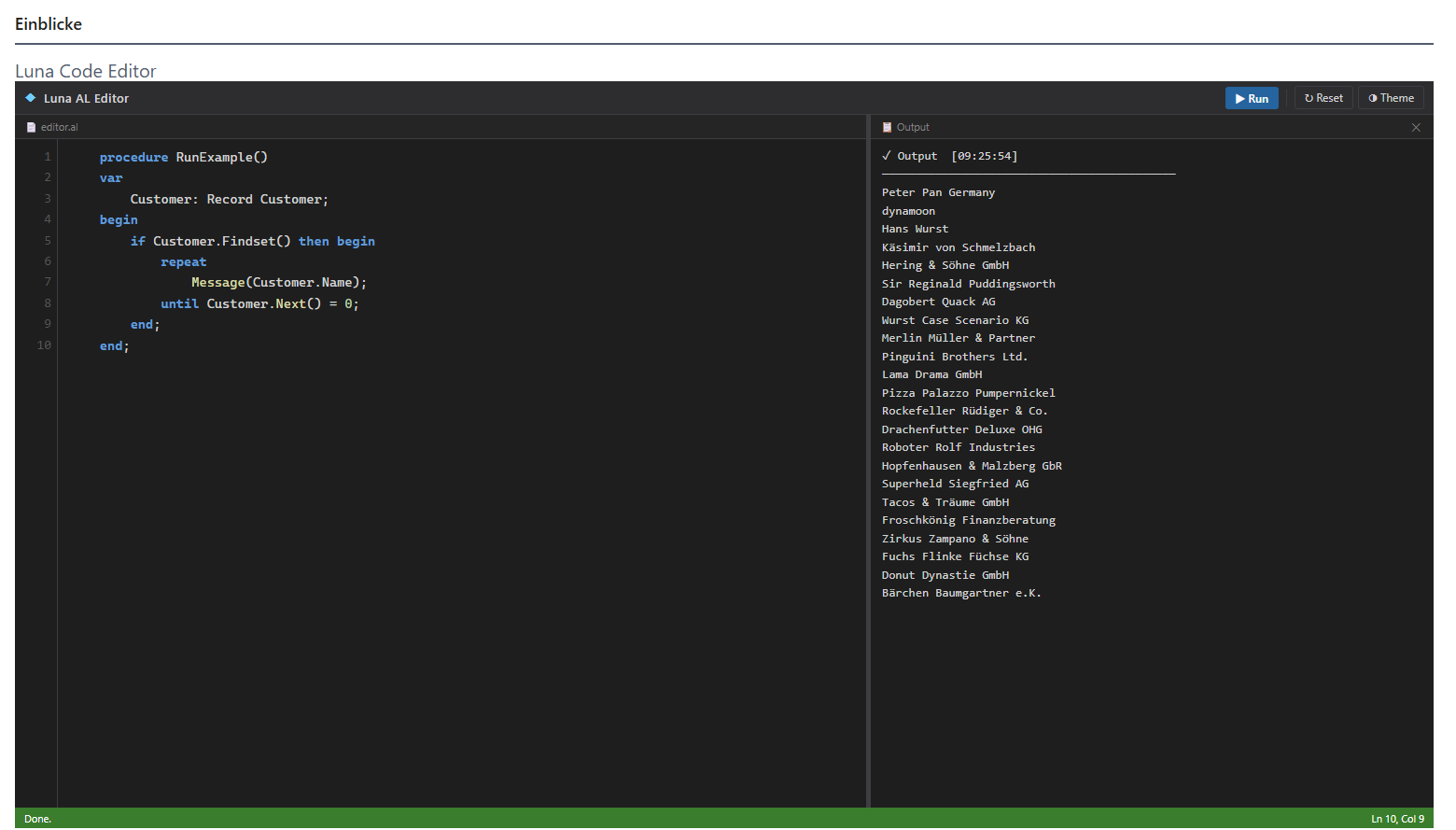
Luna AL Code Editor integriert einen AL-Code-Editor direkt in Ihr Business Central Role Center – ohne VS Code. AL-Snippets schreiben und sofort ausführen.
Unterstützt: Variablen (Integer, Decimal, Text, Boolean, Date, …), if/then/else, for…to/downto, while, repeat…until, exit, Prozeduren, einfacher Record-Zugriff (FindFirst, SetRange, Insert, Modify, Delete, …) sowie gängige Built-ins (Message, Error, Format, StrSubstNo, CopyStr, Round, …).
Nicht unterstützt: case, for x in list, with, Arrays, Enums, Events oder UI-/Report-Interaktionen.
Berechtigungen und Schutz Ihrer Daten
- LUN AL EDITOR – Editor nutzen und Daten lesen. Ohne weiteres Permission Set ist der Editor schreibgeschützt.
- LUN AL EDITOR WRITE – erlaubt zusätzlich Insert, Modify, Delete, DeleteAll und ModifyAll. Weisen Sie dieses Set nur Benutzern zu, die Daten gezielt ändern sollen.
Unabhängig von den Berechtigungen gilt immer:
- Posten, Register, gebuchte Belege und Systemtabellen sind gegen Schreibzugriffe gesperrt.
- DeleteAll und ModifyAll fragen vor der Ausführung nach und zeigen die Anzahl der betroffenen Datensätze.
- Es gelten zusätzlich die normalen Business-Central-Berechtigungen des Benutzers.
luna editor gibt es auch als On-Premises-Version für Business Central im eigenen Rechenzentrum oder beim Partner. Sie nutzen eine ältere Business-Central-Version oder noch Microsoft Dynamics NAV? Schreiben Sie mir – ich prüfe, welche Version sich bereitstellen oder anpassen lässt.
On-premises versions are available as well. For older Business Central or Dynamics NAV versions, please contact me.
Support: per E-Mail an timo.schrader@dynamoon.de – Details unter Support / by email, see support.
Luna AL Code Editor embeds an AL code editor directly into your Business Central Role Center — no VS Code required. Write and run AL snippets instantly.
Supported: variables (Integer, Decimal, Text, Boolean, Date, …), if/then/else, for…to/downto, while, repeat…until, exit, procedures, basic Record access (FindFirst, SetRange, Insert, Modify, Delete, …), and common built-ins (Message, Error, Format, StrSubstNo, CopyStr, Round, …).
Not supported: case, for x in list, with, arrays, enums, events, or any UI/report interactions.
Permissions and protection of your data
- LUN AL EDITOR – use the editor and read data. Without any further permission set the editor is read-only.
- LUN AL EDITOR WRITE – additionally allows Insert, Modify, Delete, DeleteAll and ModifyAll. Assign it only to users who are meant to change data.
Regardless of permissions:
- Ledger entries, registers, posted documents and system tables are always protected against writes.
- DeleteAll and ModifyAll ask for confirmation and show the number of affected records.
- The user's regular Business Central permissions still apply.
End User License Agreement – Luna AL Code Editor
Last updated: April 2026
This software ("Luna AL Code Editor") is provided by dynamoon as-is, without any warranty of any kind, express or implied.
Use at your own risk.
The extension allows users to write and execute AL code directly inside Microsoft Business Central. Executed code may read from or write to your live database. You are solely responsible for the code you run and any consequences thereof, including unintended data modification or loss.
No liability.
To the maximum extent permitted by applicable law, dynamoon shall not be liable for any direct, indirect, incidental, or consequential damages arising from the use or inability to use this software, including but not limited to data loss, business interruption, or system failures.
No support obligation.
We provide this extension without any obligation to offer support, updates, or bug fixes.
By installing or using this extension, you agree to these terms.
Nutzungsbedingungen – Luna AL Code Editor
Stand: April 2026
Diese Software („Luna AL Code Editor") wird von dynamoon ohne jegliche Gewährleistung bereitgestellt.
Nutzung auf eigene Gefahr.
Die Erweiterung ermöglicht es, AL-Code direkt in Microsoft Business Central zu schreiben und auszuführen. Ausgeführter Code kann lesend und schreibend auf Ihre Live-Datenbank zugreifen. Sie sind allein verantwortlich für den ausgeführten Code und alle daraus resultierenden Folgen, einschließlich unbeabsichtigter Datenänderungen oder -verluste.
Haftungsausschluss.
Im größtmöglichen gesetzlich zulässigen Umfang haftet dynamoon nicht für direkte, indirekte oder mittelbare Schäden, die aus der Nutzung oder Nichtnutzbarkeit dieser Software entstehen – insbesondere nicht für Datenverlust, Betriebsunterbrechungen oder Systemausfälle.
Kein Supportanspruch.
Wir stellen diese Erweiterung ohne Verpflichtung zu Support, Updates oder Fehlerbehebungen bereit.
Mit der Installation oder Nutzung der Erweiterung stimmen Sie diesen Bedingungen zu.